
• New
Custom mint green Map Leggings featuring a gray coastal street map design on the lower legs, shown with white sneakers.
search
  • Custom mint green Map Leggings featuring a gray coastal street map design on the lower legs, shown with white sneakers.
  • Custom Map Leggings with Personalized Location | MapStuff
  • Custom Map Leggings with Personalized Location | MapStuff
  • Custom Map Leggings with Personalized Location | MapStuff
  • Custom Map Leggings with Personalized Location | MapStuff
  • Custom Map Leggings with Personalized Location | MapStuff
  • Custom red and gold Map Leggings featuring bold street and coastal map details.
  • Custom Map Leggings with Personalized Location | MapStuff
  • Custom green and white Map Leggings featuring a bold street map design, shown from the back with white athletic shoes.
  • Custom black Map Leggings featuring a subtle dark street map design with orange label details, shown with white athletic shoes.
  • Custom navy blue Map Leggings featuring light blue coastal map details, shown in a plus-size fit with black athletic shoes.
  • Custom navy blue Map Leggings featuring light blue coastal map details, shown in a plus-size fit with black athletic shoes.

Custom Map Leggings

$42.99

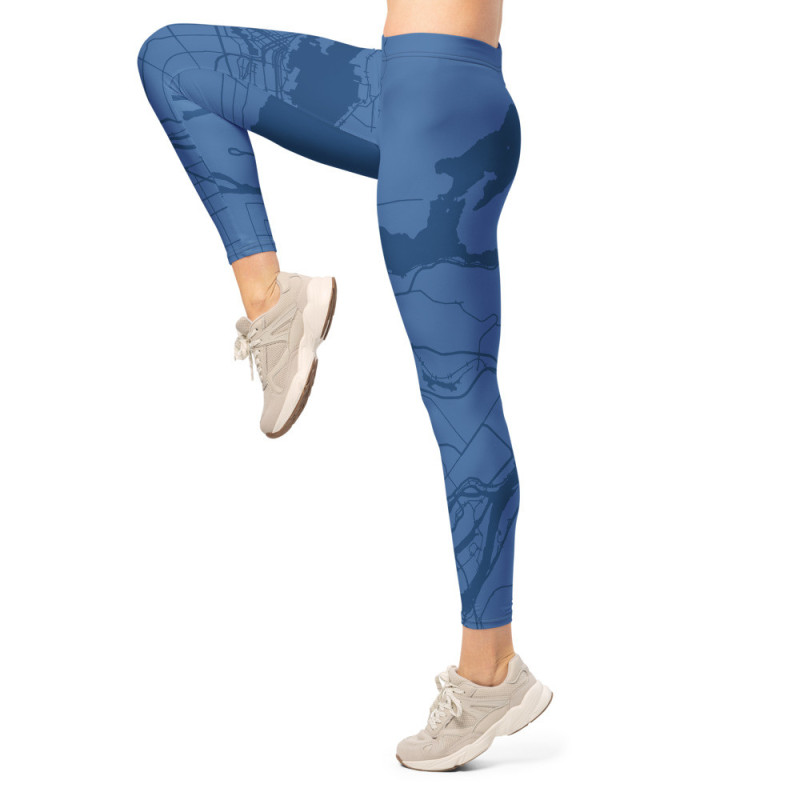
Chart your style with Custom Map Leggings printed with your own design. Pick any location and we’ll wrap it in a crisp, all-over map that moves with you. They are soft and stretchy, and uniquely yours—made for workouts, weekends, and everywhere in between. Choose your location, colors, labels, and details to create wearable art based on a favorite city, trail area, campus, coastline, or meaningful place.

  • Microfiber moisture-wicking fabric with 4-way stretch
    (82% polyester, 18% spandex / UPF 50+)
  • Waist is mid-rise, so it sits at the natural waistline.
  • Leggings are full length, ending right above the ankle.
  • Personalized with your chosen location 
  • Great for runners, hikers, travelers, teachers, students, and geography fans
  • A fun custom gift for activewear fans, map lovers, and hometown enthusiasts

Product customization

Don't forget to save your customization to be able to add to cart
  • 250 char. max
  • 250 char. max
  • 250 char. max
  • No selected file .gif .jpg .jpeg .jpe .png .webp
  • 250 char. max
  • 250 char. max
  • 250 char. max
  • 250 char. max
  • 250 char. max
  • 250 char. max
  • 250 char. max
  • 250 char. max
  • 250 char. max
  • No selected file .gif .jpg .jpeg .jpe .png .webp
  • No selected file .gif .jpg .jpeg .jpe .png .webp
  • No selected file .gif .jpg .jpeg .jpe .png .webp
  • No selected file .gif .jpg .jpeg .jpe .png .webp
  • 250 char. max
  • 250 char. max
  • 250 char. max
  • 250 char. max
  • 250 char. max
  • 250 char. max
  • 250 char. max
Size: XS
Quantity

Back Right Leg Left Leg Front Front Back

Preview guide: The map within the unshaded areas will be the most visible on your finished leggings and will show on the outward facing side of each leg, wrapping around to the front and back sides. Some of the lightly shaded area may also appear, especially on larger sizes. The dark shaded areas will not be visible. For best results, place your most important map details in the unshaded area. Use the slider below the map to adjust the overlay opacity.

The blue dotted line approximates the outside of each leg. The red dotted line denotes the approximate crotch point. The green dotted lines represent the top of the waistband. Anything above the green will be folded over to the inside of waistband.

Finished product note: Each pair of leggings is made to order, so slight variations in color, placement, and fit are normal. The pattern overlay is for preview purposes only and will not appear on the final product. Note that rough surfaces like concrete or brick may snag the fabric, so be somewhat careful.

Map Colors

Click the color squares to choose your own colors, or click Generate Palette.

Stitching Color

Select a color for the stitching.

Map Pointer

Display a pointer on the map. Click and drag the pointer to any location.

Mirror Pattern

Check this box if you want each leg to be a mirror image of the other.

Labels

Check this box if you want labels to show on the map.

Label Size
Fix Label Orientation

Keep place labels upright instead of rotating them with the map.

Map Rotation

Move the slider to rotate the map.

Size

Select a size. Size Guide

Map Seam Adjustment

Back

The map seam is where the left and right sides of the map image come together on the garment. It is on the back by default. Adjust the slider to move the seam to the left or right sides, or the front. The adjustment will not show on the map graphic to the left, but will show in the mockups after you press the Save Design button.

Comments (0)
No customer reviews for the moment.